
Freya (![[personal profile]](https://www.dreamwidth.org/img/silk/identity/user.png) aesthetics) wrote in
aesthetics) wrote in ![[community profile]](https://www.dreamwidth.org/img/silk/identity/community.png) bootycall2020-07-17 10:07 pm
bootycall2020-07-17 10:07 pm
aesthetics) wrote in bootycall2020-07-17 10:07 pm


Entry tags:

[042] the answer to the universe is floating sidebars ✔
 |
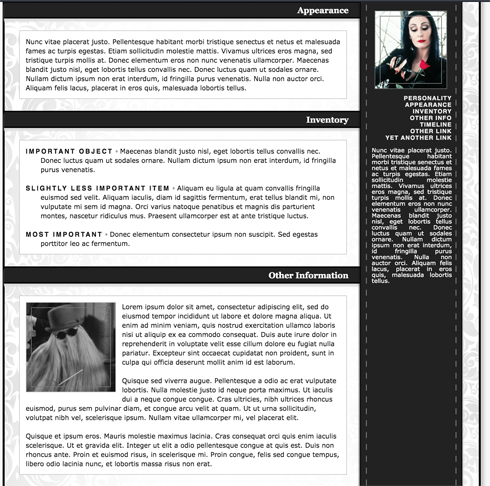  |
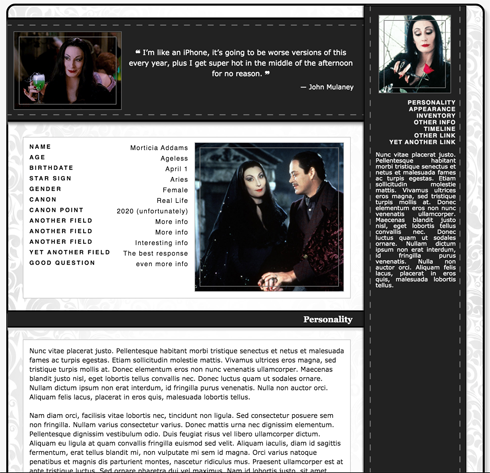
Like having a ridiculous amount of info in one place? Like it when you can still view at the lovely face of your character while scrolling through walls of text and inventories? Well, that's exactly what this is for! Add as many different informational sections as you need for your character while enjoying a tasteful side-bar. This also functions as a menu where you can jump to new sections within the page, or do double-duty as navigation by linking to other pages on your journal.
See below for a live preview!
Name Morticia Addams
Age Ageless
Birthdate April 1
Star Sign Aries
Gender Female
Canon Real Life
Canon Point 2020 (unfortunately)
Another Field More info
Another Field More info
Another Field Interesting info
Yet another Field The best response
good questioneven more info
Personality
Nunc vitae placerat justo. Pellentesque habitant morbi tristique senectus et netus et malesuada fames ac turpis egestas. Etiam sollicitudin molestie mattis. Vivamus ultrices eros magna, sed tristique turpis mollis at. Donec elementum eros non nunc venenatis ullamcorper. Maecenas blandit justo nisl, eget lobortis tellus convallis nec. Donec luctus quam ut sodales ornare. Nullam dictum ipsum non erat interdum, id fringilla purus venenatis. Nulla non auctor orci. Aliquam felis lacus, placerat in eros quis, malesuada lobortis tellus.
Nam diam orci, facilisis vitae lobortis nec, tincidunt non ligula. Sed consectetur posuere sem non fringilla. Nullam varius consectetur varius. Donec mattis urna nec dignissim elementum. Pellentesque dignissim vestibulum odio. Duis feugiat risus vel libero ullamcorper dictum. Aliquam eu ligula at quam convallis fringilla euismod sed velit. Aliquam iaculis, diam id sagittis fermentum, erat tellus blandit mi, non vulputate mi sem id magna. Orci varius natoque penatibus et magnis dis parturient montes, nascetur ridiculus mus. Praesent ullamcorper est at ante tristique luctus. Sed ornare pharetra dui vel maximus. Nam id lobortis justo, sit amet euismod massa. Aliquam sed sem eu libero sollicitudin laoreet. Donec facilisis lorem felis, sed semper diam condimentum congue.
Nam diam orci, facilisis vitae lobortis nec, tincidunt non ligula. Sed consectetur posuere sem non fringilla. Nullam varius consectetur varius. Donec mattis urna nec dignissim elementum. Pellentesque dignissim vestibulum odio. Duis feugiat risus vel libero ullamcorper dictum. Aliquam eu ligula at quam convallis fringilla euismod sed velit. Aliquam iaculis, diam id sagittis fermentum, erat tellus blandit mi, non vulputate mi sem id magna. Orci varius natoque penatibus et magnis dis parturient montes, nascetur ridiculus mus. Praesent ullamcorper est at ante tristique luctus. Sed ornare pharetra dui vel maximus. Nam id lobortis justo, sit amet euismod massa. Aliquam sed sem eu libero sollicitudin laoreet. Donec facilisis lorem felis, sed semper diam condimentum congue.
Appearance
Nunc vitae placerat justo. Pellentesque habitant morbi tristique senectus et netus et malesuada fames ac turpis egestas. Etiam sollicitudin molestie mattis. Vivamus ultrices eros magna, sed tristique turpis mollis at. Donec elementum eros non nunc venenatis ullamcorper. Maecenas blandit justo nisl, eget lobortis tellus convallis nec. Donec luctus quam ut sodales ornare. Nullam dictum ipsum non erat interdum, id fringilla purus venenatis. Nulla non auctor orci. Aliquam felis lacus, placerat in eros quis, malesuada lobortis tellus.
Inventory
Important Object ▫ Maecenas blandit justo nisl, eget lobortis tellus convallis nec. Donec luctus quam ut sodales ornare. Nullam dictum ipsum non erat interdum, id fringilla purus venenatis.
Slightly less important item ▫ Aliquam eu ligula at quam convallis fringilla euismod sed velit. Aliquam iaculis, diam id sagittis fermentum, erat tellus blandit mi, non vulputate mi sem id magna. Orci varius natoque penatibus et magnis dis parturient montes, nascetur ridiculus mus. Praesent ullamcorper est at ante tristique luctus.
Most important ▫ Donec elementum consectetur ipsum non suscipit. Sed egestas porttitor leo ac fermentum.
Slightly less important item ▫ Aliquam eu ligula at quam convallis fringilla euismod sed velit. Aliquam iaculis, diam id sagittis fermentum, erat tellus blandit mi, non vulputate mi sem id magna. Orci varius natoque penatibus et magnis dis parturient montes, nascetur ridiculus mus. Praesent ullamcorper est at ante tristique luctus.
Most important ▫ Donec elementum consectetur ipsum non suscipit. Sed egestas porttitor leo ac fermentum.
Other Information
Lorem ipsum dolor sit amet, consectetur adipiscing elit, sed do eiusmod tempor incididunt ut labore et dolore magna aliqua. Ut enim ad minim veniam, quis nostrud exercitation ullamco laboris nisi ut aliquip ex ea commodo consequat. Duis aute irure dolor in reprehenderit in voluptate velit esse cillum dolore eu fugiat nulla pariatur. Excepteur sint occaecat cupidatat non proident, sunt in culpa qui officia deserunt mollit anim id est laborum.
Quisque sed viverra augue. Pellentesque a odio ac erat vulputate lobortis. Nulla molestie justo id neque porta maximus. Ut iaculis dui a neque congue congue. Cras ultricies, nibh ultrices rhoncus euismod, purus sem pulvinar diam, et congue arcu velit at quam. Ut ut urna sollicitudin, volutpat nibh vel, scelerisque ipsum. Nullam vitae ullamcorper mi, vel placerat elit.
Quisque et ipsum eros. Mauris molestie maximus lacinia. Cras consequat orci quis enim iaculis scelerisque. Ut et gravida elit. Integer ut elit a odio pellentesque congue at quis est. Duis non rhoncus ante. Proin et euismod risus, in scelerisque mi. Proin congue, felis sed congue tempus, libero odio lacinia nunc, et lobortis massa risus non erat.
Quisque sed viverra augue. Pellentesque a odio ac erat vulputate lobortis. Nulla molestie justo id neque porta maximus. Ut iaculis dui a neque congue congue. Cras ultricies, nibh ultrices rhoncus euismod, purus sem pulvinar diam, et congue arcu velit at quam. Ut ut urna sollicitudin, volutpat nibh vel, scelerisque ipsum. Nullam vitae ullamcorper mi, vel placerat elit.
Quisque et ipsum eros. Mauris molestie maximus lacinia. Cras consequat orci quis enim iaculis scelerisque. Ut et gravida elit. Integer ut elit a odio pellentesque congue at quis est. Duis non rhoncus ante. Proin et euismod risus, in scelerisque mi. Proin congue, felis sed congue tempus, libero odio lacinia nunc, et lobortis massa risus non erat.
Timeline
|
►
July 5, 2020
Thread. Mauris vel lacinia orci. Vivamus laoreet at enim ac gravida. Sed mollis mi massa, in lobortis mi tempus id.
|
◄
Month 00, 0000
Thread. Sed volutpat ligula urna, eu auctor felis mattis ut.
|
|
►
Month 00, 0000
Thread. Nunc ultrices ante erat, a tincidunt lorem condimentum eget.
|
◄
Month 00, 0000
Thread. Donec pharetra elit et nunc sollicitudin vehicula. Aenean vehicula dolor et tincidunt egestas. Maecenas sit amet rhoncus dui. Vestibulum dapibus suscipit lectus, ac aliquam eros.
|
Nunc vitae placerat justo. Pellentesque habitant morbi tristique senectus et netus et malesuada fames ac turpis egestas. Etiam sollicitudin molestie mattis. Vivamus ultrices eros magna, sed tristique turpis mollis at. Donec elementum eros non nunc venenatis ullamcorper. Maecenas blandit justo nisl, eget lobortis tellus convallis nec. Donec luctus quam ut sodales ornare. Nullam dictum ipsum non erat interdum, id fringilla purus venenatis. Nulla non auctor orci. Aliquam felis lacus, placerat in eros quis, malesuada lobortis tellus.
Instructions
Please read the instructions for information on how to piece together multiple parts of the code. They are broken up for ease of use in customization.

The Code
I always recommend using a text-editing program for ease of use when adjusting codes! I like using [ BRACKETS ] which is a free program that really helps with visualizing different tags and markers by automatically color-coding.Please read the instructions for information on how to piece together multiple parts of the code. They are broken up for ease of use in customization.
|
Header (Default) |
Header (Custom BG) |
|
Top Profile |
Footer |
|
CONTENT: Profile Card |

|
|
CONTENT: Basic Text |

|
|
CONTENT: List |

|
|
CONTENT: Text w/ Image |

|
|
CONTENT: Timeline |

|
Instructions
Please follow the instructions below carefully. These should cover all of the requirements you will need to be aware of in order to successfully use the code. However, if you have any questions or find any functionality issues, please let me know!
- First place the <!--HEADER-->, <!--TOP PROFILE-->, and <!--FOOTER--> codes together one page. This is the skeleton of the code. Any and all infromation sections will go between the two <!--CONTENT--> markers that begin after the TOP PROFILE and before the FOOTER. The start of each section will have the label <!--SECTION START-->
- The floating sidebar is located in the <!--FOOTER--> under the tag <!--MENU-->. This is where you will add more links to content either on this page or to other pages on your journal for ease of access.
- Every section should have an associated <a name="VALUE"> where the value is unique to the section you want it to jump to. I.E. For the Personality used <a name="persona"> on the section title. The corresponding link in the menu goes to <a href="#persona">. It doesn't matter what you use as long as they are uniue. (1, 2, 3, etc. are all unique)
- Add an image next to the top quote by replacing **TOPIMAGEURL** with the URL of your image.
- Add an image to the sidebar by replacing **SIDEBARIMGURL** with the URL of your image.
- All paragraphs must use an HTML break as this format is in raw-code. That means using <p> or <br/> between paragraphs or lines.
- The different types of sections are all 100% optional! If you don't need anything fancy I recommend using the Basic Text content section type. Customize however you like!
- For all sections, change the header title by updating **SECTIONTITLE** with your text.
- If you choose the CUSTOM BG header and want something other than the white Victorian flower background, replace **BACKGROUNDIMGURL** with the URL of your image. Light colors are suggested but you're free to use whateer you want. If you image needs to repeat on the x or y axis, be sure to edit the third value in the background-repeat property.
- If you use the PROFILE CARD, add an image by replacing **PROFILECARDIMGURL** with the URL of your image.
- If you use the TEXT W/ IMAGE, add an image by replacing **YOURIMAGEURL** with the URL of your image.
- If you use the TIMELINE code, update the timelie name by changin **TIMELINENAME** with your text. To add more nodes on your timeline, copy and paste everything from the start of the indicated <tr> to the ending </tr>. These are indicated with <!--ROWSTART--> to <!--ROWSTOP-->
- Please keep the code at the bottom so others can find out where to get this as well!
Tweaking & Customization
Make this code your own! Here are some tips and tricks to adjusting different variables.
- Find and replace the color #0059b2 to change the color of in-text links.
- Move your image within any div layer by adjusting the background-position property from center to any other direction or value. Please visit [ this page ] for instructions and options to how to manipulate this if you are unfamiliar.
- You can change the size of your image in the div layer by adjusting the background-size property from cover to any other size. Please visit [ this page ] for instructions and options to how to manipulate this if you are unfamiliar
- You can adjust the inner border on the images by editing outline-offset: -10px to a different pixel value (negative values bring it within the existing div layer, positive values push it out), or removing it entirely if you prefer not to have it.